How to Connect a Momentary Switch

In the world of electronics, the momentary switch stands as a pivotal component, offering both simplicity and versatility in a wide array of applications. Whether you’re a DIY enthusiast, an electronics hobbyist, or someone venturing into this field for the first time, learning how to connect a momentary switch is an essential skill. This guide will walk you through everything you need to know, from understanding the switch itself to safely connecting it in various circuits.

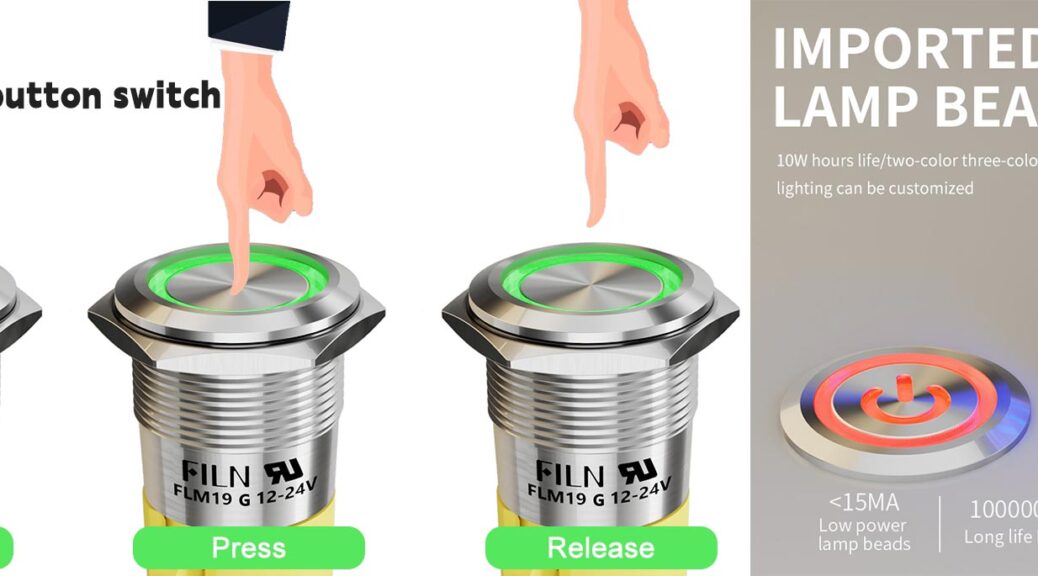
push button switch

Overview of Momentary Switches and Their Applications

Momentary switches, often referred to as push-to-make or push-to-break switches, are ubiquitous in modern electronics. They are the small but mighty devices behind many everyday interactions, like ringing a doorbell, activating a computer power button, or resetting electronic devices. The primary characteristic of a momentary switch is that it only remains active as long as it’s being pressed. Once released, it returns to its default state, either completing or breaking the circuit depending on its configuration.

These switches are vital in situations where a temporary connection is needed. Because of their design, momentary switches find themselves in various applications—from simple DIY projects to complex industrial systems.

What is a Momentary Switch?

A momentary switch is an electrical switch that only makes or breaks a connection while the actuator (the part that is pressed) is engaged. Unlike a maintained switch, which stays in one state until actuated again, a momentary switch reverts to its original position when released. This type of switch is classified into two main types: Normally Open (NO) and Normally Closed (NC).

Normally Open (NO) Momentary Switches: In this configuration, the circuit is incomplete until the switch is pressed, creating a connection.

Normally Closed (NC) Momentary Switches: In contrast, the circuit remains complete until the switch is pressed, breaking the connection.

momentary-push-button-switch

Momentary vs. Maintained Switches: What’s the Difference?

Understanding the difference between momentary and maintained switches is crucial when selecting the right switch for your project.

  • Momentary Switches: As mentioned, these only activate when pressed and deactivate when released. They are ideal for short-duration tasks such as signaling, activating devices momentarily, or initiating a process that doesn’t need continuous operation.
  • Maintained Switches: These switches stay in their new state until they are actuated again. Common in light switches and toggle switches, maintained switches are better suited for applications requiring a persistent change in the circuit state.

The decision between the two depends on your project’s requirements. Momentary switches are preferred in scenarios where short-term control is needed without a continuous current flow.

Common Uses of Momentary Switches

Momentary switches are versatile and can be found in a wide range of applications. Some of the most common uses include:

  • Doorbells: When you press a doorbell, the circuit closes and sends power to the bell or chime, which rings until the button is released.
  • Reset Buttons: In many electronic devices, a momentary switch is used to reset the device, ensuring that the action only happens when the button is pressed.
  • Keyboards: Each key on a keyboard functions as a momentary switch, sending a signal only when pressed.
  • Industrial Controls: Momentary switches are often used in machinery controls, where they might be employed to initiate a process or machine operation temporarily.

Types of Momentary Switches

Momentary switches come in various designs and configurations to suit different applications. Some of the common types include:

  • Push Button Switches: The most recognizable type, activated by pressing down on a button.
  • Toggle Momentary Switches: These appear similar to traditional toggle switches but return to their original position after being actuated.
  • Foot Switches: Common in applications where hands-free operation is required, such as in guitar pedals or sewing machines.
  • Rotary Momentary Switches: These switches activate when turned but spring back to their default position after being released.

Each type of momentary switch serves specific needs and can be selected based on the requirements of your project.

Essential Tools for Connecting a Momentary Switch

Before you dive into connecting a momentary switch, having the right tools at hand is crucial for a smooth and successful operation. Here’s a list of tools you’ll likely need:

  • Screwdrivers: Both flathead and Phillips types, depending on the switch terminals.
  • Wire Strippers: For removing the insulation from the ends of your wires.
  • Soldering Iron and Solder: If a permanent connection is required, these tools will help you securely attach wires to terminals.
  • Multimeter: To test the connections and ensure continuity in the circuit.
  • Electrical Tape: For insulating connections and preventing shorts.
  • Heat Shrink Tubing: Provides a more durable insulation compared to electrical tape, especially useful in environments with movement or vibration.

Choosing the Right Momentary Switch for Your Project

Selecting the correct momentary switch depends on the specifics of your project. Consider the following factors:

  • Current and Voltage Rating: Ensure the switch can handle the electrical load it will control. Using a switch with a lower rating than your circuit could lead to failure or a safety hazard.
  • Size and Mounting Style: The physical dimensions and mounting method (e.g., panel mount, surface mount) should fit your project’s design.
  • Actuation Force: Different switches require different amounts of pressure to activate. Choose a switch that feels comfortable for the intended use.
  • Environmental Factors: If the switch will be used outdoors or in harsh environments, look for a switch with appropriate environmental sealing.
momentary switch

Understanding Basic Electrical Circuits

Before connecting a momentary switch, it’s important to have a basic understanding of how electrical circuits work. At its core, an electrical circuit is a closed loop that allows electricity to flow from a power source, through a load (such as a light bulb or motor), and back to the source.

The flow of electricity is controlled by switches, which either complete (close) or break (open) the circuit. In the case of a momentary switch, the circuit is only closed (or opened) for the duration of the button press.

What is a Normally Open (NO) Circuit?

In a Normally Open (NO) circuit, the default state is “open,” meaning that the circuit is incomplete and no current flows. Pressing the momentary switch temporarily completes the circuit, allowing electricity to flow. This configuration is often used in applications where the switch’s purpose is to momentarily power a device, such as a doorbell or a buzzer.

What is a Normally Closed (NC) Circuit?

Conversely, in a Normally Closed (NC) circuit, the default state is “closed,” meaning the circuit is complete and electricity flows continuously. Pressing the momentary switch breaks the circuit, interrupting the current flow. This setup is useful in safety systems, where the circuit should normally be closed, and the switch is used to break the connection only when necessary.

Power Sources: Batteries vs. Power Supplies

When connecting a momentary switch, you’ll need a power source. The two most common options are batteries and power supplies.

  • Batteries: Batteries are portable and provide a DC (direct current) power source. They are ideal for small, mobile projects where AC (alternating current) power isn’t available.
  • Power Supplies: Power supplies convert AC from the wall into a stable DC output. These are better for stationary projects that require a continuous power source.

Step-by-Step Guide to Connecting a Momentary Switch

Now that you have a good understanding of momentary switches and the basics of electrical circuits, it’s time to get hands-on with connecting your momentary switch. Follow these steps carefully to ensure a successful connection.

Preparing Your Workspace and Safety Precautions

Before starting any electrical work, it’s essential to prepare your workspace. Ensure that your work area is clean, dry, and well-lit. Avoid working on live circuits; always disconnect power before beginning your work. Wear safety goggles to protect your eyes from any sparks, and if you’re soldering, work in a well-ventilated area to avoid inhaling fumes.

Step 1: Identify the Terminals on the Momentary Switch

Momentary switches typically have two or more terminals. These terminals are where you’ll connect your wires.

  • Two-Terminal Switches: If your switch has two terminals, one terminal is for the input (from the power source) and the other for the output (to the load).
  • Three-Terminal Switches: Some switches have three terminals, which might include a common terminal (COM) and separate Normally Open (NO) and Normally Closed (NC) terminals.

Identify these terminals before proceeding, as connecting wires to the wrong terminals can prevent the switch from functioning correctly.

Step 2: Connect the Momentary Switch to the Circuit

With your terminals identified, it’s time to connect the switch to the circuit:

  1. Connect the Power Source: Attach the positive wire from your power source (battery or power supply) to the appropriate terminal on the momentary switch (typically the COM or input terminal).
  2. Connect the Load: Connect a wire from the NO terminal to the positive side of your load (e.g., a motor or LED).
  3. Complete the Circuit: Attach the negative wire from your power source to the negative side of your load. This completes the circuit.

If you’re using a Normally Closed configuration, the process is similar, but the load connects to the NC terminal instead.

Step 3: Test the Connection

Once the switch is connected, it’s time to test the circuit:

  • Power On: Turn on your power source. If you’re using a battery, ensure it’s charged.
  • Press the Switch: Engage the switch. In a Normally Open circuit, the load should activate while the button is pressed. In a Normally Closed circuit, the load should deactivate.
  • Check for Issues: If the load doesn’t respond as expected, recheck your connections. A multimeter can help verify that the switch is functioning correctly by checking continuity.

Wiring a Momentary Switch in a Simple Circuit

A simple circuit is a great starting point for anyone new to working with momentary switches. Here’s how to wire a momentary switch to a basic circuit with a power source and an LED:

  • Connect the Positive Wire: Attach the positive wire from your power source to one terminal of the momentary switch.
  • Connect the Load: Run a wire from the other terminal of the switch to the positive leg (longer leg) of the LED.
  • Complete the Circuit: Connect the negative leg of the LED to the negative wire of the power source.

In this setup, the LED will light up when you press the momentary switch, completing the circuit.

How to Wire a Momentary Switch with an LED

Wiring a momentary switch to control an LED is straightforward and a great way to visualize how these switches work:

  • Connect the Power Source: Run the positive wire from your power source to one terminal of the switch.
  • Connect the LED: Attach a wire from the other terminal of the switch to the positive side of the LED.
  • Complete the Circuit: Connect the negative side of the LED back to the power source’s negative terminal.

When you press the switch, the circuit completes, allowing current to flow through the LED, lighting it up.

Tips for Soldering Wires to a Momentary Switch

Soldering provides a secure and durable connection but requires a steady hand and attention to detail. Here are some tips:

  • Clean the Surfaces: Ensure the switch terminals and wires are clean before soldering.
  • Use the Right Amount of Solder: Too much solder can create bridges between terminals, causing shorts. Use just enough to cover the connection.
  • Heat the Connection, Not the Solder: Apply the soldering iron to the terminal and wire first, then touch the solder to the heated area.

Common Issues and How to Fix Them

Even with careful setup, issues can arise when connecting momentary switches. Here’s how to troubleshoot some common problems:

  • No Response When Pressing the Switch: Check the power supply and ensure the switch is properly connected. Use a multimeter to test for continuity when the switch is pressed.
  • The Load Stays On/Off Regardless of the Switch: This could be due to a short circuit or a miswired switch. Double-check your connections, especially around the switch terminals.
  • Switch Doesn’t Spring Back: If the switch doesn’t return to its default position, it might be physically damaged or dirty. Cleaning the switch or replacing it might be necessary.

Momentary Push Button Switch FAQ

  1. How does a momentary switch differ from a regular switch?
    A momentary switch only stays active while being pressed, while a regular (maintained) switch stays in its new state until actuated again. This makes momentary switches ideal for applications requiring temporary control.
  2. Can I use a momentary switch to control a light bulb?
    Yes, but the light will only stay on while the switch is pressed. For continuous lighting, a maintained switch is recommended.
  3. What type of wire should I use with a momentary switch?
    Use wire that matches the current and voltage requirements of your circuit. For low-power applications, 22-24 gauge wire is typical, while higher currents may require thicker wire.
  4. How can I make my momentary switch more responsive?
    Ensure the switch is clean and free of debris. Regularly inspect the internal mechanism, and if necessary, apply a small amount of contact cleaner.
  5. Is it safe to use a momentary switch with high voltage?
    Only if the switch is rated for high voltage. Always check the switch’s specifications and ensure it matches the requirements of your circuit to avoid hazards.
  6. What should I do if the switch doesn’t return to its default position?
    The switch may be stuck due to dirt or physical damage. Try cleaning the switch or, if the issue persists, replace it to ensure proper functionality.

Summary and Final Thoughts on Connecting a Momentary Switch

Connecting a momentary switch might seem daunting at first, but with the right knowledge and tools, it’s a task that can be accomplished with confidence. Understanding the basics of electrical circuits and the specific role of momentary switches is crucial to ensuring your project works as intended. Whether you’re integrating a switch into a simple LED circuit or a more complex relay system, the steps outlined in this guide provide a solid foundation.

Take the time to choose the right switch, prepare your tools, and follow safety precautions. With practice, you’ll find that connecting a momentary switch is not only straightforward but also a valuable skill in electronics and DIY projects.
Fill out my online form.

What Is the Difference Between Momentary and Latching Push Buttons?

In the world of electronics, switches play a crucial role in controlling circuits. Among the most common types are momentary and latching push buttons. While these two may appear similar at first glance, they function differently and serve distinct purposes. Understanding the difference between momentary and latching push buttons is essential for anyone involved in electronics design, repair, or installation.

Understanding Push Buttons

Push buttons are simple mechanical devices that complete or interrupt a circuit when pressed. Their primary purpose is to control the operation of various electrical devices. Whether you’re turning on a light, starting a motor, or initiating a process, push buttons are often the interface between humans and machines.

Push buttons come in many forms, but they can generally be classified into two main categories: momentary and latching. The distinction between these two types lies in how they behave after being pressed.

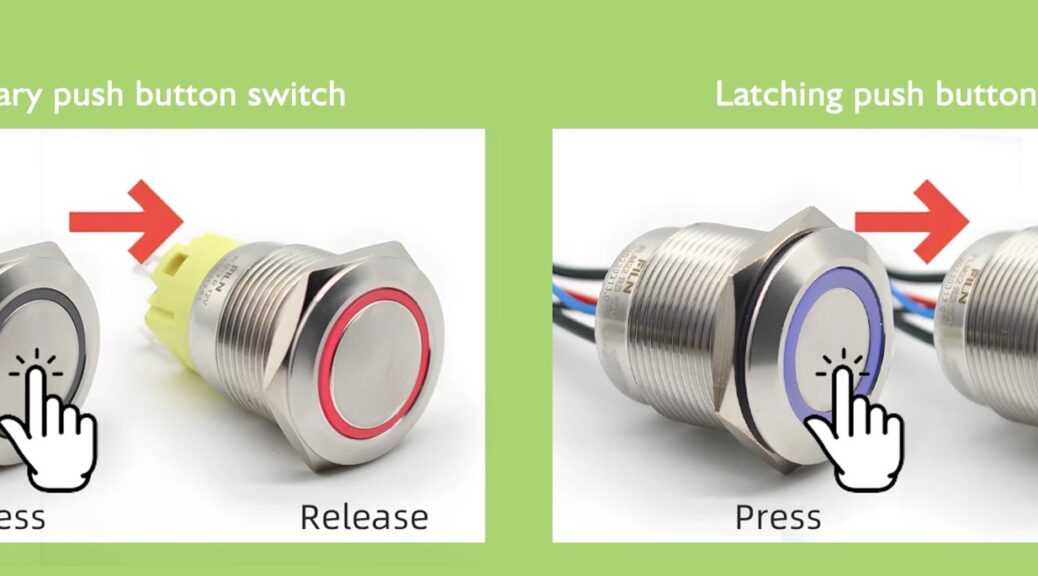
A momentary push button is a type of switch that only remains active as long as it is being pressed. Once you release the button, it returns to its original state, and the circuit is interrupted. These switches are commonly used in applications where a temporary action is required.

Applications of Momentary Push Buttons

Momentary push buttons are widely used in devices where brief, intermittent control is needed. Some typical applications include:

  • Doorbells: The button is pressed to complete the circuit and ring the bell, and it returns to its original state when released.
  • Reset Buttons: On computers or other electronic devices, momentary push buttons are used to reset the system by sending a temporary signal.
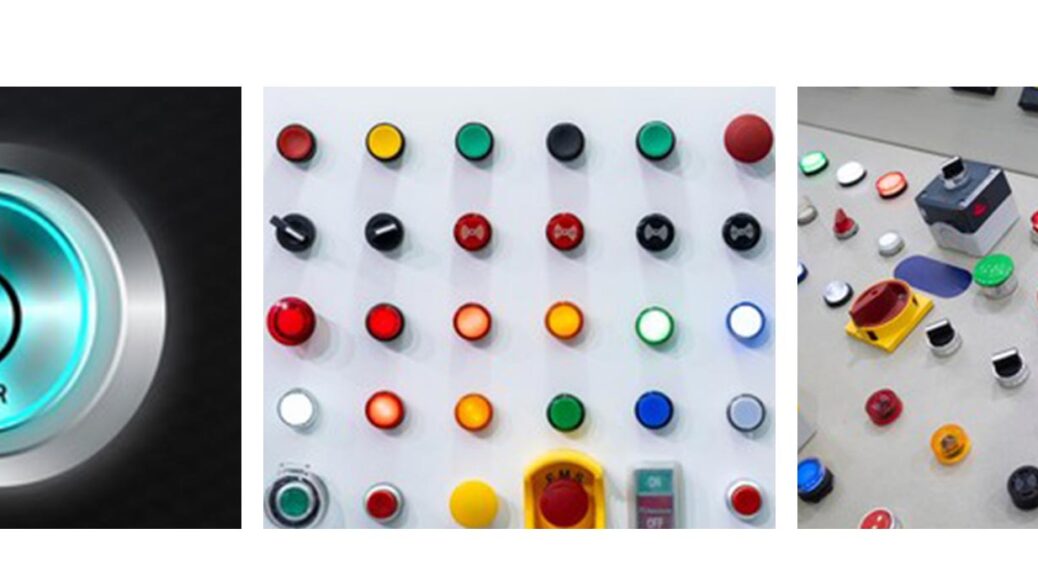
  • Control Panels: In industrial settings, momentary push buttons are often used to start or stop a machine temporarily.
  • Keyboards: Each key on a keyboard is a momentary push button that sends a signal only when pressed.

Momentary push buttons are ideal for applications where you don’t want the switch to remain in the “on” position after activation.

momentary-push-button-switches

What Is a Latching Push Button?

In contrast, a latching push button remains in its activated state even after you release it. Pressing the button changes its state and keeps the circuit closed until the button is pressed again to open the circuit. This type of button “latches” in place until it is manually reset.

Applications of Latching Push Buttons

Latching push buttons are used in situations where a sustained action is necessary without requiring continuous pressure. Examples of latching push button applications include:

  • Power Switches: On devices like lamps or appliances, a latching push button is used to turn the device on or off. Once pressed, the button remains in the “on” position until pressed again.
  • Emergency Stop Buttons: In industrial settings, latching buttons are used as safety mechanisms to stop machines in emergencies. The machine remains off until the button is manually reset.
  • Security Systems: Some alarm systems use latching buttons to maintain an alert status until the system is reset.
  • Lighting Controls: Latching buttons are often used in lighting systems to keep lights on without continuous pressure.

Latching push buttons are beneficial when you need a circuit to remain active without holding the button down.

latching-push-button-switch

Key Differences Between Momentary and Latching Push Buttons

The primary difference between momentary and latching push buttons is how they behave after being pressed. Momentary push buttons only stay active while being pressed, while latching push buttons maintain their state until they are pressed again.

Behavior and Circuit Control

  • Momentary Push Buttons: These buttons provide temporary control. The circuit is only complete while the button is pressed. Once released, the circuit opens, stopping the current flow.
  • Latching Push Buttons: These buttons provide sustained control. After pressing, the circuit remains closed (or open) until the button is pressed again, toggling the state.

Mechanical Design

Momentary and latching push buttons differ in their internal mechanisms. Momentary buttons typically use a spring-loaded design that pushes the button back to its original position after release. Latching buttons, however, have a mechanism that locks the button in place when pressed, requiring a second press to release it.

User Experience and Safety

Momentary push buttons are ideal for actions that should only occur while the button is actively engaged. This can be safer in certain scenarios, such as when you need a machine to stop as soon as pressure on the button is released. Latching buttons, on the other hand, are suited for situations where continuous operation is needed without constant user interaction, like keeping a light on.

Choosing the Right Push Button for Your Needs

When selecting between momentary and latching push buttons, consider the specific requirements of your application. Here are some factors to help guide your decision:

Application Requirements

  • Temporary vs. Continuous Action: Determine if your application requires a temporary action (momentary) or a sustained one (latching). For example, a doorbell (momentary) vs. a light switch (latching).
  • Safety Considerations: In scenarios where immediate disengagement is crucial, momentary push buttons may be safer. Conversely, if safety requires the circuit to remain closed until manually reset, a latching button is better.

User Interaction

  • Ease of Use: Consider how the user will interact with the button. Momentary buttons require constant pressure, which might be inconvenient for some applications, while latching buttons need only a single press to activate.
  • Feedback and Control: Think about whether users need to have tactile feedback indicating the state of the circuit. Latching buttons often provide a more definitive feedback since the button stays in its activated position.

Environmental Factors

  • Durability: Consider the environmental conditions the button will be exposed to. Latching buttons are often more complex and may require more maintenance than momentary ones.
  • Exposure to Elements: If the button will be exposed to moisture, dust, or extreme temperatures, ensure it is designed to withstand such conditions, regardless of whether it is momentary or latching.

Push Button Switch FAQs

  1. What are the main types of push buttons?
    Push buttons are generally classified into momentary and latching types, each serving different functions based on how they maintain or release their state after being pressed.
  2. Which is safer, momentary or latching push buttons?
    Safety depends on the application. Momentary buttons are safer for applications requiring immediate disengagement, while latching buttons are better for sustained actions.
  3. Can a latching push button be used in place of a momentary push button?
    Typically, no. The application dictates the type of button needed. Using a latching button in place of a momentary one could lead to unintended continuous operation.
  4. What industries commonly use latching push buttons?
    Latching push buttons are widely used in industrial control systems, emergency stop mechanisms, security systems, and household devices like lamps and power tools.
  5. Are momentary push buttons more durable than latching ones?
    Durability varies by design and quality. Momentary buttons may be simpler and more robust in environments with frequent use, while latching buttons might require more maintenance.
  6. Can I use both types of push buttons in the same system?
    Yes, it’s common to use both types in the same system depending on the needs of different components. For instance, a control panel might use momentary buttons for certain functions and latching buttons for others.

Conclusion

The difference between momentary and latching push buttons is significant and should be carefully considered when designing or selecting a control system. Momentary push buttons are ideal for temporary actions that require immediate disengagement, while latching push buttons are best for sustained operations where the circuit needs to remain active without constant user interaction. By understanding the unique characteristics of each type, you can make informed decisions that enhance both the functionality and safety of your electronic systems.

Fill out my online form.

What Is a Momentary Push Button Switch? A Complete Guide

In the world of electronics and electrical devices, switches play a crucial role in controlling circuits. One type of switch that stands out for its specific functionality is the momentary push button switch. This article will explore what a momentary push button switch is, how it works, and why it’s used in various applications. By the end, you’ll have a clear understanding of its features, benefits, and where it’s commonly used.

momentary-push-button-switch

1. What Is a Momentary Push Button Switch?

A momentary push button switch is a type of switch that remains active only as long as it is being pressed. Unlike standard on/off switches, which maintain their position after being toggled, a momentary switch returns to its default state once released. This means the circuit is completed only when the button is actively pressed down.

2. How Does a Momentary Push Button Switch Work?

Momentary push button switches operate on a simple mechanism. When you press the button, it temporarily closes (or opens) the circuit, allowing electricity to flow. Once you release the button, the switch automatically returns to its original position, breaking the circuit.

There are two common types of momentary switches:

  • Normally Open (NO): The circuit is open (off) when the button is not pressed. Pressing the button closes the circuit, allowing current to flow.
  • Normally Closed (NC): The circuit is closed (on) when the button is not pressed. Pressing the button opens the circuit, stopping the current flow.

3. Advantages of Momentary Push Button Switches

3.1 Precise Control

One of the primary advantages of momentary push button switches is the precise control they offer. Since the switch is only active while being pressed, it allows for quick, temporary activation of a circuit, which is essential in many applications like doorbells, computer keyboards, and machine control panels.

3.2 Durability

These switches are often designed to withstand repeated use, making them durable and reliable. They are built for high-cycle environments, where the switch will be pressed frequently, without suffering from wear and tear as quickly as other types of switches.

3.3 Safety

Momentary switches enhance safety by ensuring that a device or machine does not remain active unintentionally. Since the switch automatically returns to its off position, it reduces the risk of accidental activation, which can be crucial in applications like industrial machinery.

3.4 Space-Efficient

Many momentary push button switches are compact, allowing them to be integrated into small or space-constrained devices. This makes them ideal for portable electronics, handheld tools, and compact control systems.

4. Common Applications of Momentary Push Button Switches

4.1 Consumer Electronics

Momentary push button switches are found in a variety of consumer electronics, such as:

  • Keyboards: Each key is a momentary switch that registers input only when pressed.
  • Remote Controls: Buttons on remotes are momentary, sending signals while pressed.
  • Power Tools: Drills and saws often use momentary switches to control operation.

4.2 Automotive Industry

In vehicles, momentary push button switches are used for functions like:

  • Horn Activation: The horn sounds only while the button is pressed.
  • Ignition Systems: Some modern cars use a momentary push button to start or stop the engine.

4.3 Industrial Equipment

In industrial settings, momentary push button switches are essential for:

  • Control Panels: Used to trigger operations temporarily.
  • Emergency Stop Buttons: Allow operators to stop machinery immediately by pressing the button.

4.4 Security Systems

Momentary push button switches are also widely used in security systems, such as:

  • Doorbells: The bell rings only while the button is pressed.
  • Access Controls: Pressing the button temporarily disengages locks or alarms.
push button switches Applications 1

5. How to Choose the Right Momentary Push Button Switch

When selecting a momentary push button switch for your application, consider the following factors:

  • Type (NO or NC): Determine whether you need the switch to close or open the circuit when pressed.
  • Current and Voltage Ratings: Ensure the switch can handle the electrical load of your circuit.
  • Size and Mounting: Choose a switch that fits within the available space and can be mounted easily.
  • Durability: Consider switches that are built to last, especially in high-usage environments.

Purchase more momentary push button switch

6. Conclusion

A momentary push button switch is a versatile, durable, and safe component used in a wide range of applications. From consumer electronics to industrial machinery, its ability to provide precise control makes it a popular choice. Whether you’re designing a new product or upgrading an existing system, understanding the benefits and uses of momentary push button switches will help you make the right decision.

Fill out my online form.

What is a Push Button Light Switch?

Introduction

Ever walked into a room and, with a gentle push of a button, the entire space is instantly illuminated? That seamless action is made possible by something called a push button light switch. In a world where smart homes and sleek designs are gaining traction, these switches are becoming increasingly popular. But what exactly is a push button light switch, and why should you consider one for your home or office?

push-button-light-switches

Understanding Push Button Light Switches

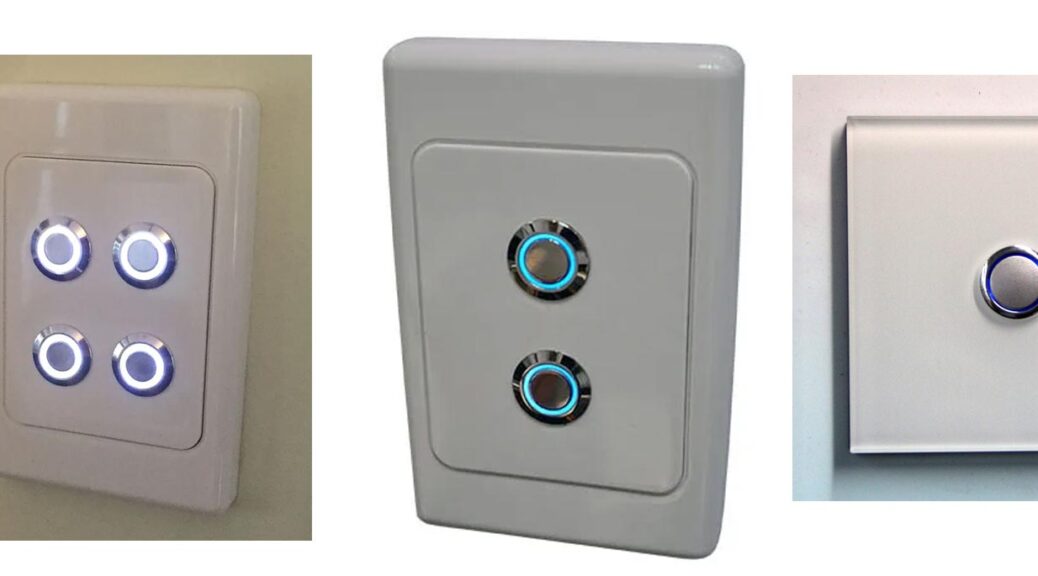
A push button light switch is a device used to control the electrical current that powers a light fixture. Instead of the traditional toggle switch, which you flip up or down, a push button switch operates with a simple push. These switches can either be momentary—where the button needs to be held down to maintain the circuit—or latching, where the button is pressed once to turn the light on and pressed again to turn it off.

Types of Push Button Light Switches

  1. Momentary Push Button Switches: These switches require continuous pressure to stay on. Once you release the button, the circuit breaks, and the light turns off. These are often used in applications like doorbells.
  2. Latching Push Button Switches: With these, a single press is enough to switch the light on or off. They “latch” into place until the button is pressed again.

Materials and Design Variations

Push button switches come in a variety of materials including plastic, metal, and glass, making them suitable for a range of interior styles. Whether you prefer a sleek, modern look with a glass finish or a more industrial feel with metal, there’s a push button switch design to match.

How Push Button Light Switches Work

The functionality of a push button light switch is straightforward yet fascinating. When you press the button, it physically moves internal components that either complete or break the circuit. This action allows or prevents the flow of electricity to the light fixture. The mechanics are simple: a spring mechanism inside the switch allows it to return to its original position after being pressed, especially in momentary switches.

Comparison with Traditional Toggle Switches

While traditional toggle switches have been around for decades, push button switches offer a more modern aesthetic. Toggle switches require a more deliberate action to operate, while push button switches provide a quicker, more fluid experience. Additionally, push button switches tend to be quieter than toggles, making them a preferred choice in settings where noise minimization is key.

Advantages of Push Button Light Switches

Why would someone choose a push button light switch over a traditional one? Here are a few compelling reasons:

Aesthetic Appeal and Modern Design

Push button switches are sleek and stylish, fitting perfectly in contemporary interiors. Their minimalist design can add a touch of elegance to any room, making them a popular choice for modern homes and businesses.

Durability and Longevity

These switches are often built to last, with many models offering high durability due to their sturdy materials and design. The simple mechanism inside means there are fewer parts to wear out, which can extend the life of the switch.

Ease of Use and Accessibility

For those with mobility issues or arthritis, the ease of use provided by a push button switch can be a significant advantage. A simple push requires less force than flipping a toggle, making it more accessible.

Customization Options

With a variety of materials, colors, and designs available, you can easily find a push button switch that complements your space. Some even offer customization, allowing you to choose the finish, button style, and backlighting to match your decor.

Common Applications of Push Button Light Switches

Push button light switches are versatile and can be used in a variety of settings:

Residential Use

In homes, push button switches are commonly found in areas where style and function are equally important. Kitchens and living rooms often feature these switches due to their clean look. In bedrooms and bathrooms, they offer convenience and a touch of modern design.

Commercial and Industrial Use

In commercial settings like offices, push button switches are valued for their sleek appearance and ease of use. They’re also found in industrial environments, often on control panels where precision and reliability are essential.

Installation and Setup

Thinking of installing a push button light switch? Here’s a step-by-step guide:

  1. Turn Off the Power: Safety first! Always switch off the power at the circuit breaker before starting any electrical work.
  2. Remove the Old Switch: Unscrew and carefully disconnect the wires from your old switch.
  3. Connect the Wires: Attach the wires to your new push button switch, following the manufacturer’s instructions.
  4. Secure the Switch: Screw the switch into place and attach the faceplate.
  5. Test the Switch: Turn the power back on and test your new switch to ensure it’s working properly.

Important Safety Considerations

If you’re not comfortable working with electrical components, it’s best to hire a professional. Incorrect installation can lead to electrical shorts, fires, or other hazards.

Hiring a Professional vs. DIY Installation

While DIY installation can save money, hiring a professional ensures the job is done safely and correctly. If you’re unsure, it’s worth the investment to have peace of mind.

Maintenance and Troubleshooting

Push button switches are generally low-maintenance, but here’s how to keep them in top shape:

Regular Maintenance Tips

  • Clean the Surface: Wipe the switch regularly to remove dust and grime.
  • Check for Loose Wires: Periodically check the wires inside the switch box to ensure they’re still securely connected.

Common Issues and How to Fix Them

  • Flickering Lights: This could indicate a loose connection. Check the wiring or consult an electrician.
  • Sticking Button: If the button sticks when pressed, it may need to be cleaned or lubricated.

When to Replace Your Push Button Light Switch

If your switch is no longer functioning properly, or if it’s become an eyesore, it might be time for a replacement. A switch that’s frequently malfunctioning could also be a sign of deeper electrical issues.

Smart Push Button Light Switches

The rise of smart home technology has brought push button switches into the digital age:

Introduction to Smart Technology in Light Switches

Smart push button switches can be controlled via apps, voice commands, or even automated schedules. They offer the same ease of use with added convenience and functionality.

Integration with Smart Home Systems

These switches can easily be integrated with systems like Google Home or Amazon Alexa, allowing for remote control and automation of your lighting.

Benefits of Smart Push Button Light Switches

Beyond the cool factor, smart switches offer energy savings, enhanced security (through features like remote operation), and the convenience of managing your lighting from anywhere.

Cost Considerations

The price of push button light switches can vary widely:

Price Range for Different Types of Push Button Light Switches

Basic models can start as low as $10, while high-end or smart versions can cost upwards of $100. The cost will depend on factors like materials, design, and additional features.

Factors Affecting the Cost

Customization options, smart technology integration, and brand reputation can all influence the price of a push button switch.

Cost vs. Benefit Analysis

While push button switches might be more expensive than traditional toggles, their durability, style, and potential for smart integration make them a worthwhile investment.

Environmental Impact and Sustainability

In an eco-conscious world, it’s worth considering the environmental impact of your choices:

Eco-friendly Materials Used

Many manufacturers now offer switches made from sustainable materials, reducing their environmental footprint.

Energy Efficiency of Push Button Light Switches

Smart push button switches can help reduce energy consumption by allowing more precise control over lighting.

Recycling and Disposal Considerations

When replacing old switches, be sure to dispose of them properly. Many electronic components can be recycled to reduce waste.

Popular Brands and Manufacturers

Several brands stand out when it comes to push button light switches:

Overview of Leading Brands

Brands like Legrand, Lutron, and Schneider Electric are well-known for their quality and innovation in this space.

What to Look for When Choosing a Brand

Consider factors like warranty, customer reviews, and the availability of replacement parts when choosing a brand.

Customer Reviews and Testimonials

Reading reviews can provide valuable insights into the performance and longevity of different switches.

Future Trends in Push Button Light Switches

What does the future hold for these handy devices?

Innovations in Design and Functionality

Expect to see even more integration with smart technology, as well as designs that cater to specific user needs, such as accessibility features.

Growing Demand for Smart and Sustainable Options

As smart homes become more common, the demand for intelligent, sustainable switches will continue to rise.

Predictions for the Next Decade

Look for continued innovation, with a focus on making switches more user-friendly, eco-friendly, and adaptable to a wide range of settings.

Comparison with Other Light Switch Technologies

How do push button switches stack up against other types?

Toggle Switches

Toggle switches are the most basic and familiar, but they lack the modern aesthetic and functionality of push button switches.

Rocker Switches

Rocker switches offer a similar modern look but operate differently, requiring a press at one end rather than the center.

Dimmer Switches

Dimmer switches allow for adjustable lighting levels, something some push button switches can do, especially smart versions.

User Experiences and Reviews

Here’s what real users have to say:

Real-life Testimonials from Users

Users often praise push button switches for their style, ease of use, and reliability.

Pros and Cons Based on User Feedback

Pros include aesthetics, ease of use, and the potential for smart integration. Cons might include a higher price point or the need for professional installation.

How to Choose the Right Push Button Light Switch for Your Needs

Consider your budget, design preferences, and whether you want smart functionality when choosing a switch.

Conclusion

In conclusion, push button light switches offer a modern, stylish alternative to traditional toggle switches. With their ease of use, durability, and potential for smart home integration, they’re a fantastic choice for both residential and commercial settings. Whether you’re looking to upgrade your home’s lighting system or simply add a touch of contemporary design, a push button light switch is a great option.

FAQs

  1. What is the lifespan of a push button light switch?
    The lifespan can vary, but high-quality switches can last 10-15 years or more with proper maintenance.
  2. Can push button light switches be used with LED lights?
    Yes, most push button switches are compatible with LED lighting, but it’s important to check the specifications.
  3. Are push button light switches compatible with dimmer functions?
    Some models are, particularly smart versions, but standard push button switches typically do not have dimming capabilities.
  4. How do you clean and maintain a push button light switch?
    Wipe the surface regularly with a dry or slightly damp cloth, and avoid using harsh chemicals.
  5. Is it possible to upgrade an existing light switch to a push button light switch?
    Yes, most traditional light switches can be replaced with a push button light switch, though you may need to adjust the wiring.
Fill out my online form.

What is the Function of a Stop Push Button Switch?

Introduction to Stop Push Button Switches

A stop push button switch is an essential component in various industrial applications, providing a quick and efficient way to halt machinery and equipment during emergencies. FILN, a leading manufacturer in this domain, has recently launched a new stop push button switch featuring LED illumination and IP67 waterproof capabilities. This article delves into the features, benefits, and applications of this innovative switch.

stop-push-button-switch

What is a Stop Push Button Switch?

Definition and Purpose

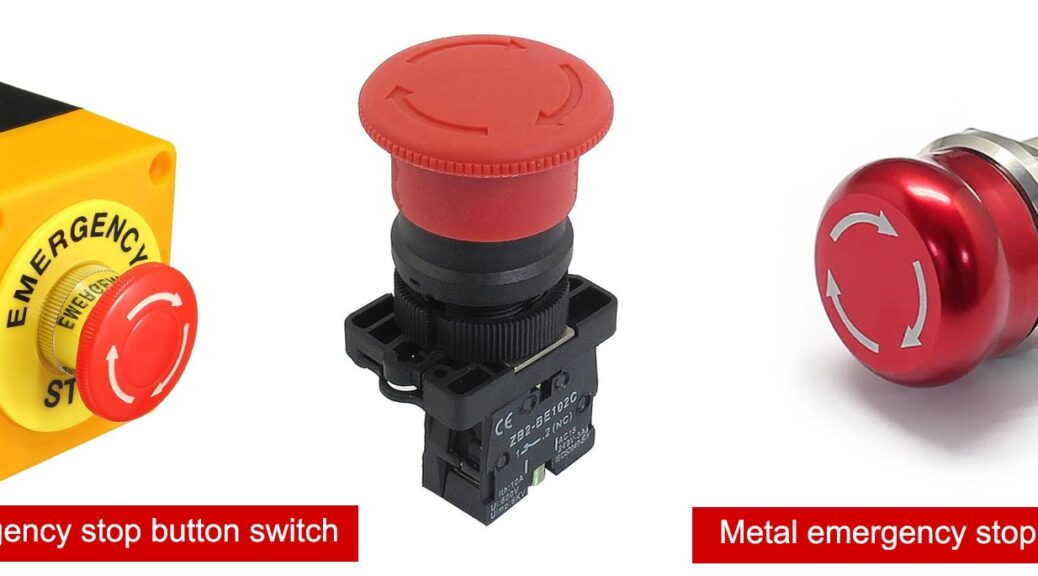
A stop push button switch, also known as an emergency stop button, is designed to immediately stop the operation of machinery when pressed. It is a crucial safety mechanism in industrial settings, ensuring the safety of both equipment and personnel.

Key Features

  • LED Illumination: The FILN stop push button switch comes equipped with an LED light, providing clear visibility in low-light conditions.
  • IP67 Waterproof Rating: The switch boasts an IP67 waterproof rating, making it suitable for use in harsh environments where exposure to water and dust is common.

The Importance of an Emergency Stop Button

Safety in Industrial Settings

Emergency stop buttons are vital for maintaining safety in industrial environments. They allow operators to quickly cease the operation of equipment, preventing accidents and reducing the risk of injury.

Compliance with Safety Standards

Having a stop push button switch is not just about safety; it’s also about compliance. Regulatory bodies often mandate the inclusion of emergency stop buttons in machinery to ensure workplace safety standards are met.

Features of FILN’s New Stop Push Button Switch

LED Illumination

The inclusion of an LED light in FILN’s stop push button switch ensures that the switch is easily identifiable even in poorly lit environments. This feature is particularly useful in emergency situations where quick identification and action are critical.

IP67 Waterproof Capability

The IP67 rating signifies that the switch is completely protected against dust ingress and can withstand immersion in water up to a depth of 1 meter for 30 minutes. This makes FILN’s stop push button switch ideal for use in outdoor applications or in environments where water exposure is frequent.

Robust Design and Durability

FILN’s stop push button switch is designed to withstand rigorous use. The robust construction ensures longevity and reliability, making it a cost-effective solution for industrial applications.

FILN’s New Emergency Stop Buttons

Applications of the Stop Push Button Switch

Industrial Machinery

In industrial machinery, an emergency stop button is a critical safety feature. FILN’s stop push button switch, with its LED illumination and IP67 rating, provides an extra layer of safety and reliability.

Outdoor Equipment

For outdoor equipment exposed to the elements, the IP67 waterproof rating of FILN’s stop push button switch ensures consistent performance and protection against water and dust.

Transportation and Automotive

In the transportation and automotive industries, emergency stop buttons are essential for the safety of operators and passengers. FILN’s switch offers the durability and visibility required for these demanding applications.

Why Choose FILN’s Stop Push Button Switch?

FILN is a manufacturer of emergency stop buttons and pushbutton switches, specializing in the production of various types of pushbutton switches. There are up to 500 kinds of products. The advantage lies in the ability to customize any pushbutton switch and it has an independent R & D capability.

Superior Safety Features

FILN’s stop push button switch offers superior safety features, including LED illumination for visibility and an IP67 waterproof rating for durability in harsh environments.

High Reliability

Designed for high reliability, FILN’s stop push button switch ensures consistent performance, making it a trusted choice for critical safety applications.

Easy Installation

The switch is designed for easy installation, allowing for quick integration into existing systems and reducing downtime during setup.

FILN is an electrical and electrical production-oriented industrial and trade integration company

Conclusion

FILN’s new stop push button switch is a significant advancement in safety switch technology. With its LED illumination and IP67 waterproof rating, it provides enhanced safety and reliability in a variety of industrial applications. Whether for industrial machinery, outdoor equipment, or transportation, FILN’s stop push button switch is an excellent choice for ensuring the safety of both equipment and personnel.

Fill out my online form.